5 Project Status Report Examples (Real, Filled-In Formats)
Five project status report examples you can copy — exec summary, RAG dashboard, agency client report, sprint, and one-pager — plus how to pick the right format.
A blank template tells you the sections; it doesn't tell you what "good" looks like. That gap is why most people searching for a status report want an example, not another empty form. And the stakes are real: projects with highly effective communication finish on time 71% of the time, versus just 37% when communication is poor (PMI, 2013).
This guide gives you five project status report examples — real, filled-in formats for different readers — shows what makes each one work, and helps you pick the right one. Each is copy-paste ready.
Key takeaways
- Five formats cover almost every situation: exec summary, RAG dashboard, client report, sprint report, and one-pager.
- The format follows the reader, not the project — an executive wants 30 seconds; a delivery team wants detail.
- Every strong example leads with a RAG status indicator and fits on one page.
- Clear communication lifts on-time delivery from 37% to 71% (PMI, 2013).
What makes a good project status report example?
A good project status report example does three things: it leads with a RAG status (red/amber/green), it fits on a single page, and it reads like a decision tool instead of a diary. Every example below shares the same six sections — status, summary, progress, next steps, milestones, and risks — because that structure is what stakeholders expect (Asana, 2024).
What separates a strong example from a weak one isn't the sections — it's the editing. The status indicator at the top carries most of the weight; a busy reader should know where things stand before reading a single bullet. Everything underneath is there to answer one follow-up question: if it's not green, what do you need from me?
The mistake in most reports is treating every section as equal. They aren't. The summary and the risks are the report; progress and milestones are evidence. Lead with the decision, support it with the detail.
A good project status report example leads with a RAG status, stays on one page, and frames everything as a decision rather than a log of activity. The six sections are standard, but the editing is what matters — PMI found clear communication raises on-time delivery from 37% to 71% (PMI, 2013), and clarity comes from cutting, not adding.
5 project status report examples (real formats)
These five project status report examples cover the situations most teams actually face: a fast executive summary, a multi-workstream RAG dashboard, a plain-language client update, a sprint report, and a one-page status report. They use the same building blocks — only the depth, tone, and audience change. Copy the one closest to your reader.
Example 1: Weekly executive summary
The shortest useful format. It's for a leader who has 30 seconds and one question: are we okay? Status, two or three sentences, and what you need from them.
WEEKLY STATUS — Acme Mobile App   ·   Week 6 of 10   ·   May 18–22

OVERALL:  🟡 At risk

Beta is live with 40 testers and feedback is strong, but App Store
review is running slower than planned, which puts the May 30 launch
at risk. We can still hold the date if Apple approves by Wednesday.

NEEDS FROM YOU:  sign-off on the final pricing copy by Tuesday.
Use this when you report to a sponsor or executive who only acts on exceptions. The amber status and the single ask do all the work.
Example 2: RAG status dashboard (multi-workstream)
When one project has several moving parts, a table beats prose. Each workstream gets its own RAG status, owner, and one note, so a reader can scan the colors and stop on the red.
PROGRAM STATUS — Marketing Site Relaunch   ·   June 9

OVERALL:  🟡 At risk

| Workstream    | Status | Owner   | Note                                |
| ------------- | ------ | ------- | ----------------------------------- |
| Design        | 🟢     | Priya   | All pages approved.                 |
| Build         | 🟢     | Marco   | 12 of 16 templates live on staging. |
| Content       | 🔴     | Client  | 6 pages still awaiting copy.        |
| SEO & launch  | 🟡     | Dana    | Redirect map blocked on content.    |

ONE THING TO FIX:  missing copy for 6 pages (owner: client, due Fri).
Use this when a program has parallel tracks and one red item is dragging the others. The dashboard isolates the blocker instead of burying it.
Example 3: Agency client status report
A client report drops the jargon. No story points, no internal tool names — just what you did, what's next, and what you need from them, in plain language a non-technical client trusts.
PROJECT UPDATE — Maison Botanique Online Store
Prepared by Northlight Studio   ·   June 9

Where things stand:  🟢 On track for the July 1 launch.

What we did this week
- Built the product and checkout pages
- Connected payments (Stripe) and placed a successful test order
- Set up your shipping zones

What's next
- Migrate your 80 products from the spreadsheet
- Build the homepage and About page

What we need from you
- Final product photos for 12 items (by Wed)
- Your returns policy wording
The first time I sent a client our internal sprint report by mistake, the reply was three confused questions. Rewriting it in plain "what we did / what's next / what we need" language ended the back-and-forth — the client didn't want detail, they wanted reassurance.
Use this when you're a freelancer or agency reporting to a client who cares about outcomes, not mechanics.
Example 4: Milestone / sprint status report
For agile delivery teams, the report tracks the sprint and the milestone it rolls up to. Committed versus completed points show velocity; the milestone line shows whether the bigger date still holds.
SPRINT STATUS — Reporting v2   ·   Sprint 14   ·   ends June 13

SPRINT GOAL:  ship CSV export and saved filters.
COMMITTED: 34 pts      COMPLETED: 26 pts      (8 pts carrying over)

🟢 On track for the milestone — Reporting v2, due June 27

Done:         CSV export, filter UI, API endpoints
In progress:  saved filters (PR in review)
Blocker:      rate-limit on the export job (owner: Sam, next sprint)
Use this when you report inside a delivery team or to a technical stakeholder who reads velocity and blockers fluently.
Example 5: One-page status report
The densest format: every section on a single scannable page for a stakeholder who wants the whole picture at a glance. It adds a percent-complete and a budget line that the lighter formats leave out.
PROJECT STATUS — Salesforce → HubSpot Migration   ·   June 1–14   ·   PM: J. Okafor

STATUS: 🟡 At risk        COMPLETE: 70%        BUDGET: 🟢 On budget

SUMMARY  Data migration is 70% done and on budget. A field-mapping
issue on custom deal stages is the one risk — it could push UAT
back a few days.

PROGRESS               NEXT PERIOD            RISKS / BLOCKERS
- Contacts migrated    - Migrate deals        - Deal-stage mapping
- Companies migrated   - Start UAT              (High · vendor · 6/16)
- Email templates set  - Train sales team     - UAT date depends on fix

MILESTONES   Data migration ✓   ·   UAT ▢ Jun 20   ·   Go-live ▢ Jul 5
Use this when a steering committee or PMO wants one artifact that covers status, budget, progress, and risk together.
These five project status report examples — exec summary, RAG dashboard, client report, sprint report, and one-pager — cover most reporting needs, and all share the same six core sections. The right one depends on the reader, not the project: highly effective communication is the difference between 37% and 71% on-time delivery (PMI, 2013), and matching the format to the audience is half of being understood.
How do you choose the right project status report format?
Choose the format by audience, not by project type. An executive wants the weekly summary; a client wants the plain-language report; a delivery team wants the sprint format; a PMO wants the one-pager or dashboard. The same project can use two formats for two readers — that's normal, not duplicated effort.
| Reader | Best format | Cadence |
|---|---|---|
| Executive / sponsor | Weekly exec summary | Weekly |
| Non-technical client | Agency client report | Weekly or biweekly |
| Multi-team program | RAG status dashboard | Weekly |
| Delivery / agile team | Sprint / milestone report | Per sprint |
| Steering committee / PMO | One-page status report | Biweekly or monthly |
Once you've picked a format, build it in the tool that fits. The Word template is right for a clean one-pager a client can forward; the Excel version suits many line items with live totals and an auto-RAG flag; and the weekly project status report template trims the structure for a fast cadence. All three live on the project status report template hub.
Choose a project status report format by matching it to the reader: executives get the short summary, clients get plain language, delivery teams get the sprint detail. The project doesn't decide the format — the audience does. That's why the same initiative often runs a weekly internal update alongside a monthly client summary (Asana, 2024).
What if you don't want to rebuild these every week?
Every example above is a snapshot, and snapshots go stale the moment your board moves on. Rebuilding them is the recurring busywork that eats 3-4 hours of the average project manager's week (PPM Express, 2024) — and automating reporting saves around 13.5 hours per project manager every month (McKinsey, via PPM Express, 2024).
There's a lighter path. Connect the board you already run — Trello, Jira, or Asana — and StatusLink turns it into a branded, read-only status page your client opens with one link. No login for them, no rebuild for you. Move a card to Done and the page updates itself, so the report that used to be a Friday write-up just stays current.
What surprised me was that the "any update?" emails simply stopped. Once a client could open a live page whenever they wondered, they didn't need to ask — and I didn't need to rebuild one of these examples to answer.
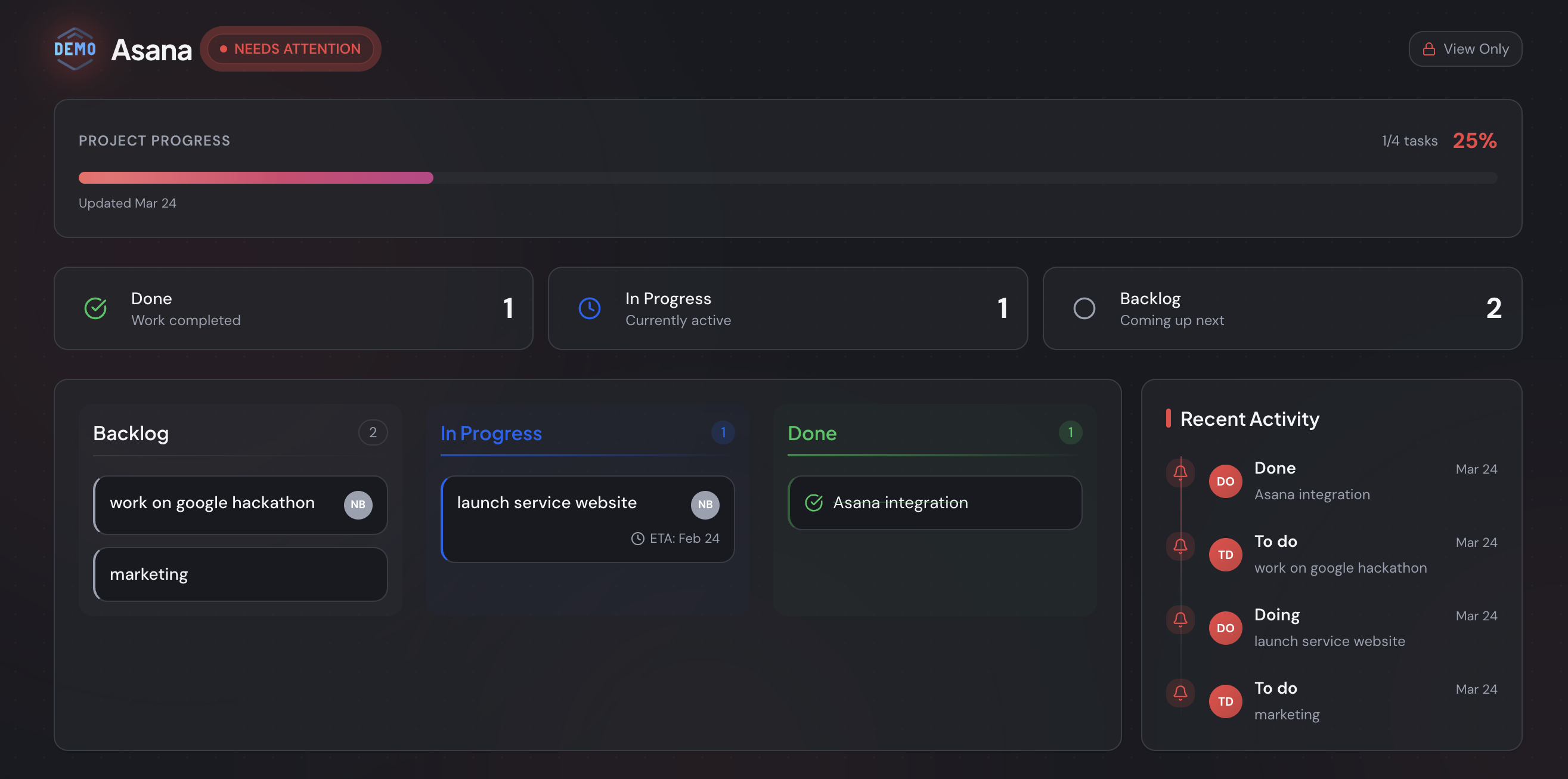
A quick honesty note: StatusLink does one thing, not everything. It isn't an invoicing or messaging suite — it keeps a status page current from your board. If you mainly need clients to see status without friction, see how a no-login client portal compares to heavier tools.
If you don't want to rebuild these examples by hand, connect a Trello, Jira, or Asana board to StatusLink and share one branded, read-only link — no client login, and it updates as you move cards. Automated reporting saves about 13.5 hours per project manager each month (McKinsey, via PPM Express, 2024).
Keep these examples for the formal updates a client wants on file. For the day-to-day "is this on track?" question, let the page write itself — you can start free and connect your board in a few minutes, or compare plans on the pricing page.
Frequently asked questions
What is a project status report example?
It's a finished, filled-in status report you can model your own on — not a blank template. A good example shows you what to actually write in each section: the RAG status, the one-line summary, progress, and the risks. Seeing a worked version is the fastest way to copy the right level of detail.
What are the most common project status report formats?
Five cover almost every situation: a weekly executive summary, a RAG status dashboard for multi-workstream programs, a plain-language client report, a sprint or milestone report for agile teams, and a one-page status report. They share the same six sections — only the depth and audience change.
What does a good project status report look like?
It leads with a RAG status indicator, fits on one page, and reads like a decision tool rather than a diary. PMI found projects with highly effective communication finish on time 71% of the time versus 37% with poor communication — so clarity, not length, is what makes a report work.
How do I write a project status report from an example?
Copy the example closest to your audience, then fill it top to bottom: set the RAG status first, list progress and risks, and write the summary last so it reflects the real picture. Keep each section to a few bullets — 45% of project managers already lose over a day a week to reporting (Wrike).
Can I automate a project status report instead of rewriting it?
Yes. A static report is stale the moment your board moves on. Tools like StatusLink sync a Trello, Jira, or Asana board into a branded, read-only status page clients open with one link — no login, no rebuild. Automated reporting saves around 13.5 hours per project manager monthly (McKinsey).